Not long ago, the idea of people meeting face-to-face through screens felt like science fiction. Today, virtual meetings have become an essential part of how we communicate, collaborate, and get things done. Whether you’re connecting with a remote team, onboarding new employees, or discussing strategy with clients, productive online meetings are now at the core of modern work. But not all virtual meetings are effective. Many teams struggle with disorganization, distractions, or lack of engagement—all of which can make meetings feel like a waste of time. That’s why adopting the best practices for virtual meetings is crucial to improving communication, focus, and outcomes. Platforms like SendMega Meet make this easier by combining video conferencing, file sharing, and collaboration tools in one secure space—helping teams conduct productive virtual meetings without technical hiccups or privacy concerns.
Why Virtual Meeting Productivity Matters
Running effective online meetings isn’t just about using the right technology. It’s about creating an environment where everyone feels engaged, and goals are achieved efficiently. When meetings are unstructured or poorly managed, teams lose time, energy, and clarity. On the other hand, productive virtual meetings lead to:
Better decision-making and accountability.
Stronger remote team communication.
Reduced meeting fatigue.
Improved collaboration and innovation.
In a world where hybrid and remote work are here to stay, mastering virtual meeting best practices isn’t optional—it’s a key business skill.
Productive Virtual Meetings Start with the Right Setup
Before applying best practices, make sure your meetings are powered by a reliable, distraction-free virtual meeting tool.
Your choice of platform directly affects the quality of your meeting experience. A good virtual meeting platform should offer:
High-quality video and audio performance. Secure, end-to-end encryption. Screen sharing and recording options. Integrated file sharing and chat.
While platforms like Zoom or Microsoft Teams are popular, SendMega stands out for combining all-in-one features—secure file sharing, cloud storage, and video conferencing—within a single interface. This makes it a powerful option for businesses looking to simplify workflows while keeping data protected.
2. Always Set a Clear Agenda
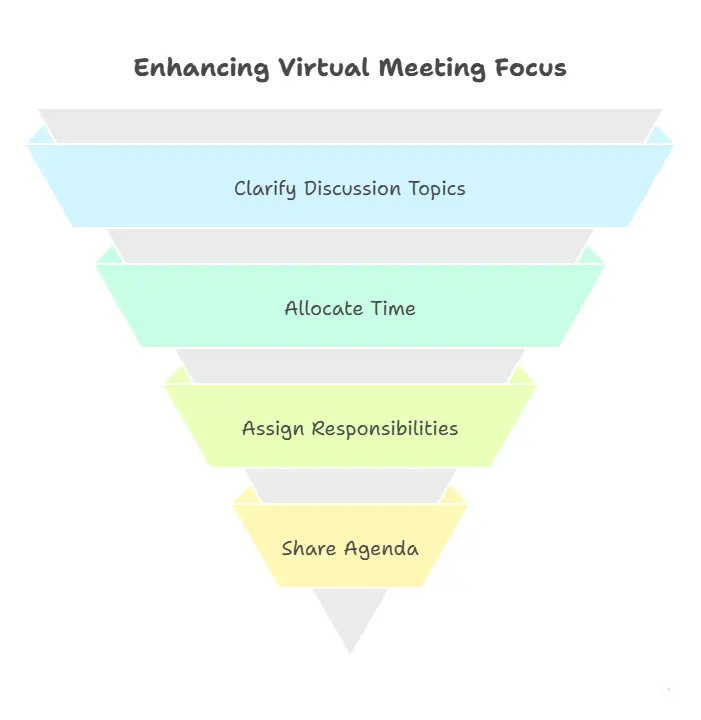
A common reason virtual meetings lose focus is the absence of an agenda. Before scheduling, clarify:
The objective of the meeting.
Discussion topics.
Time allocations.
Action items and responsibilities.
Share the agenda in advance so attendees can prepare. This keeps discussions concise and prevents unnecessary detours. Tools like SendMega make agenda sharing simple—you can upload documents, attach notes, or even collaborate on files before the meeting begins.
3. Limit Attendees to the Right Participants
Not every team member needs to join every meeting. Too many participants can lead to side conversations and diluted focus. Instead, invite only those whose input is essential to the topic. If broader awareness is needed, record the meeting and share the highlights later. This ensures efficiency while keeping everyone informed.
Technical issues are one of the biggest disruptors to virtual meeting productivity. Test your internet connection, microphone, camera, and shared documents before starting. If you’re hosting, log in a few minutes early to confirm everything works. Encourage participants to do the same—especially if they’re using new software or devices.
5. Create an Engaging Atmosphere
Engagement is harder to maintain virtually than in person. Use these techniques to keep attendees active and interested:
Begin with a quick check-in or question. Rotate speakers to maintain variety. Use visual aids like slides, charts, or demos. Encourage reactions through chat or polls. Most importantly, promote open dialogue. A productive virtual meeting feels like a conversation, not a presentation.
6. Manage Time Effectively
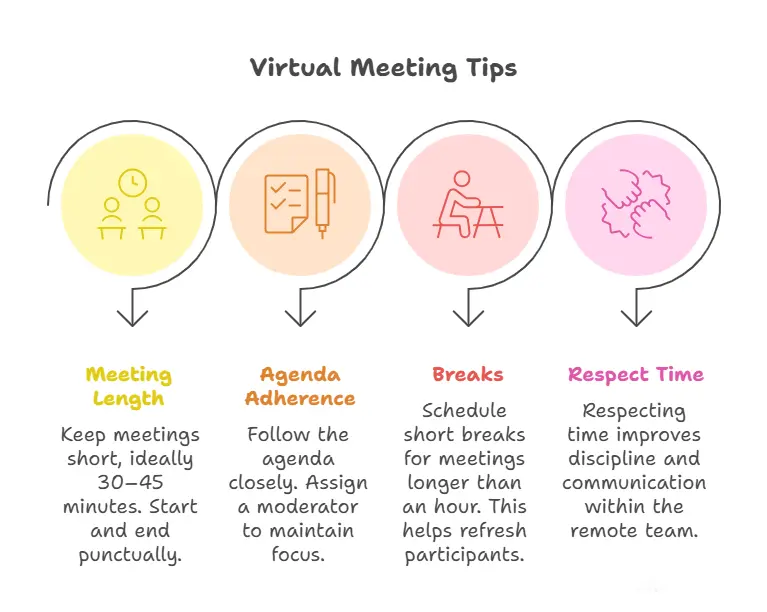
Virtual attention spans are shorter than in-person ones, so timing is key. Keep meetings within 30–45 minutes if possible, and always start and end on time.
Stick to the agenda and assign a moderator to keep discussions on track. When meetings exceed an hour, schedule a short break to refresh participants.
Virtual settings can make it easy for some voices to dominate while others stay silent. Encourage quieter team members to contribute by asking for their thoughts directly or through chat.
Rotate roles such as note-taker or timekeeper to involve everyone. Inclusivity not only boosts engagement but also ensures better decisions through diverse perspectives.
8. Maintain Proper Meeting Etiquette
Professionalism shouldn’t fade just because the meeting is online. Keep cameras on when possible, mute microphones when not speaking, and avoid multitasking.
Choose a quiet, well-lit space, and maintain good posture to signal attentiveness. These small habits contribute to a more polished and productive virtual meeting experience.
Productivity Also Depends on Meeting Etiquette
Learn how professional virtual meeting etiquette helps teams stay focused, respectful, and aligned — especially in remote settings.
After the meeting, summarize key points, action items, and deadlines. Sharing minutes ensures that no decision is forgotten and everyone stays accountable.
With tools like SendMega Meet, Google Meet, and Zoom, meeting hosts can upload notes, share recordings, and assign tasks directly after the call—keeping follow-up actions centralized and easy to track.
10. Prioritize Security and Privacy
In an era of frequent cyber threats, protecting sensitive information during online meetings is critical. Always use platforms with end-to-end encryption, strong access controls, and secure data storage.
Avoid sharing meeting links publicly or via unsecured channels. SendMega’s encrypted communication and secure file sharing help ensure confidential discussions remain private—an essential factor for companies handling proprietary data.
11. Balance Meetings with Asynchronous Communication
Not every conversation requires a meeting. Sometimes, quick chats or shared documents can replace long calls. Over-meeting drains productivity and adds unnecessary pressure to remote teams.
Adopt a hybrid communication model: use asynchronous tools for updates and virtual meetings only when real-time discussion adds value. This balance creates healthier, more productive workflows.
The Future of Virtual Collaboration
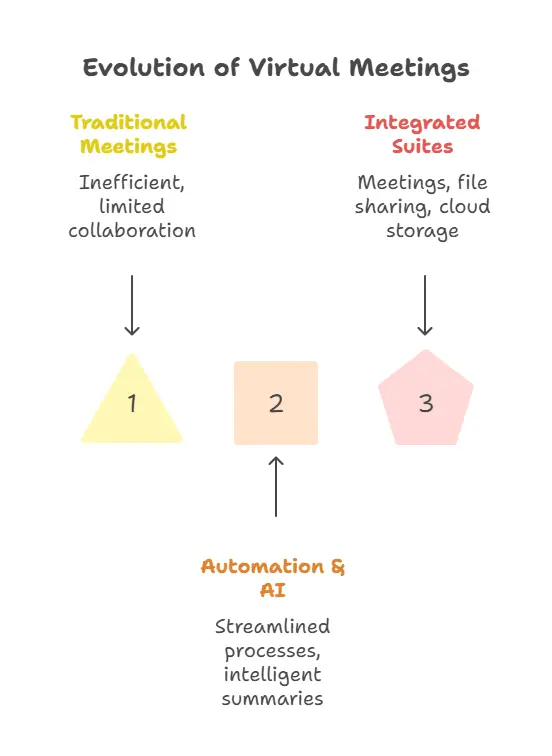
The future of virtual meetings is being shaped by automation, AI summaries, and integrated collaboration suites. As teams continue to embrace remote and hybrid models, platforms like SendMega Meet, Zoom, and Google Meet—which combine meetings, file sharing, and cloud storage—are setting new standards for efficiency and security.
Virtual meeting best practices will continue evolving, but one thing is certain: productivity comes from planning, engagement, and the right tools.
Conclusion
The shift to virtual work isn’t just a temporary change—it’s a new way of doing business. Mastering best practices for virtual meetings helps organizations communicate clearly, collaborate effectively, and save time.
From setting clear agendas to ensuring security and engagement, each step contributes to more meaningful interactions and better results. And with trusted tools like SendMega Meet, Google Meet, and Zoom teams can focus less on logistics and more on what matters—productive, secure, and connected collaboration.
Turn Best Practices into Real Results
Features like mute control, screen sharing, meeting moderation, and collaboration tools make productive virtual meetings easier to run.