


Virtual Meeting Etiquette: How to Look Professional and Stay Productive Online
Remote collaboration has become the foundation of how teams, educators, and organizations operate in today’s connected world. The shift from traditional office spaces to virtual environments has transformed the way we communicate, plan, and execute ideas. Whether it’s a quick check-in with a client, an academic discussion, a strategic business presentation, or a global conference, virtual meetings play a crucial role in keeping people aligned and projects moving forward. They eliminate geographical barriers, allowing participants from different parts of the world to engage in real time, saving both time and travel costs. However, the effectiveness of these meetings largely depends on how they are conducted.
Practicing virtual meeting etiquette not only ensures that conversations remain organized and professional but also reflects mutual respect among participants. Small actions, like being punctual, muting when not speaking, maintaining eye contact through the camera, and minimizing background noise, create a positive and productive online environment.
What is virtual meeting etiquette?
Virtual meeting etiquette refers to the set of professional behaviors, communication rules, and digital manners that help participants maintain respect and productivity during online sessions. Just like in-person meetings, virtual environments require discipline, punctuality, and focus to create a positive impression and prevent miscommunication.
According to a survey by Owl Labs, 70% of remote employees believe that proper meeting etiquette, including punctuality, clear communication, and minimizing distractions, directly affects the success of virtual collaboration.
Running Virtual Meetings?
Start with the right tool. Host professional, distraction-free online meetings that set the tone for productivity.
Start a Virtual MeetingEssential Virtual Meeting Etiquette Tips
1. Behave As You Would in an In-Person Meeting
Just because you’re behind a screen doesn’t mean the rules of professionalism disappear. Avoid multitasking, eating, or checking your phone while someone is speaking. Dress neatly and stay attentive, as if you were in the same room with your manager or clients. This approach ensures that your participation reflects respect and commitment to the meeting’s goals.
When attending virtual NA meetings or business discussions, showing full attention helps everyone stay engaged and productive. Treating online meetings with the same seriousness as in-person ones strengthens collaboration and builds trust among participants.
2. Keep Track of Your Mute Status
One of the most common mistakes in virtual meetings is forgetting to mute or unmute at the right time. Background noise, typing sounds, or even a barking dog can quickly distract everyone. Keep your microphone muted when you’re not speaking, and unmute only when it’s your turn. This small act of courtesy helps maintain a professional and distraction-free environment for all participants.
3. Turn Off Your Video Before Leaving Temporarily
Unexpected interruptions can happen; perhaps you receive an important call, or someone knocks on the door. If you need to step away, turn off your camera first. When you return, ensure you’re ready and seated before turning it back on. This avoids awkward or distracting moments and helps maintain a smooth flow in the meeting.
4. Minimize Distractions
Before joining a meeting, prepare your environment. Inform family members or housemates not to disturb you, and ensure pets are in another room. A calm, quiet space shows you take your participation seriously. Even small interruptions, like a ringing phone or a background conversation, can pull focus from important discussions.
Free virtual meeting platforms like SendMega and Google Meet allow you to use noise suppression and background blur features, which can further reduce distractions and help you appear more professional.
5. Maintain a Clean and Professional Background
Your background says a lot about you. Avoid messy rooms, cluttered shelves, or open doors behind you. Try to face a clean wall or a simple setup that doesn’t draw attention away from your face. Many virtual meeting rooms and platforms offer customizable or blurred backgrounds, which can be useful if you’re working from home.
A tidy and professional-looking background helps others stay focused on what you’re saying rather than what’s behind you.
6. Dress and Groom Professionally
Even when attending from home, dress as though you’re at the office. A polished appearance boosts your confidence and makes a strong impression on others. Choose business or business-casual attire depending on your company culture, and make sure your hair and posture look presentable on camera.
Good grooming and professional attire show respect for your colleagues and help you feel more focused during the meeting.
7. Use a Good Quality Microphone
Clear communication depends on good audio. Built-in microphones on laptops or phones often create echo or distortion. Using an external USB microphone or headset can greatly improve sound quality and make your voice easier to understand. You don’t need expensive equipment — even affordable options can make a big difference.
Platforms like SendMega or Zoom also have built-in audio testing tools to ensure your microphone works perfectly before joining the meeting.
8. Silence Phones and Other Devices
Before joining, silence your phone, alarms, and desktop notifications. These interruptions can distract you and others, especially during important presentations. A quiet, interruption-free setup keeps the meeting flow consistent and professional.
Remember to also close unnecessary browser tabs or background applications that might cause unwanted pop-up sounds or notifications during the session.
9. Learn How to Use the Virtual Meeting Platform
Whether you’re using SendMega Meet, Google Meet, Zoom, or Microsoft Teams, take time to familiarize yourself with the platform’s features. Learn how to mute and unmute, turn your camera on or off, share your screen, raise your hand, and use chat or reactions.
If you’re hosting, ensure you know how to admit participants, manage waiting rooms, mute attendees, and record the session if necessary. Understanding the controls helps avoid delays and ensures a smooth meeting experience.

Why Virtual Meeting Etiquette Matters
Practicing good etiquette during virtual meetings enhances clarity, reduces time wastage, and ensures that every participant feels respected. It also strengthens collaboration, especially when team members work across different locations or time zones.
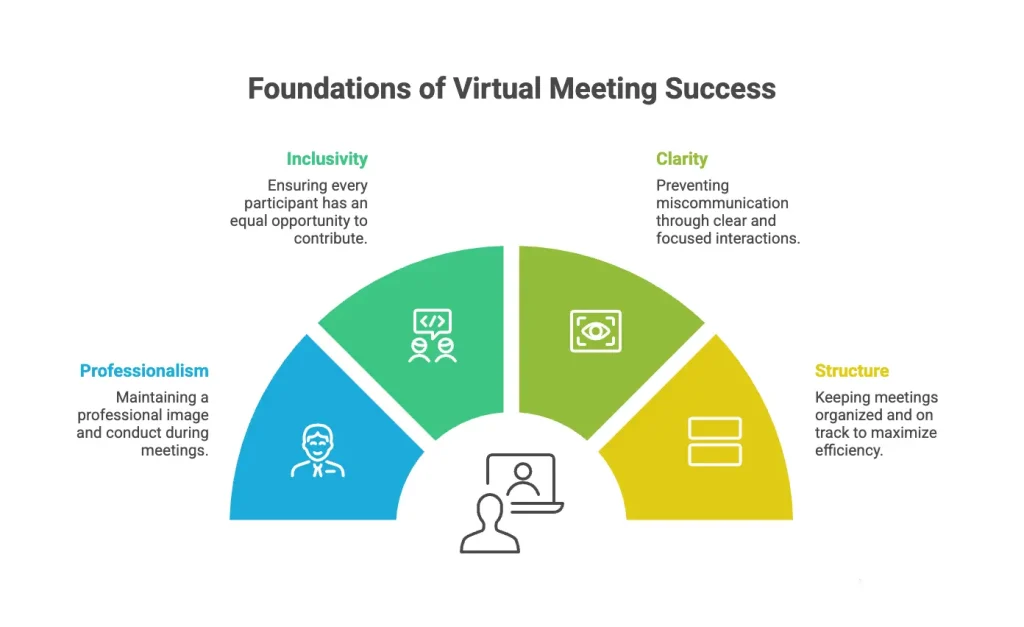
Following etiquette rules helps you:
- Maintain professionalism in front of clients or senior management.
- Ensure that every participant gets a chance to speak.
- Avoid miscommunication caused by background noise or multitasking.
- Keep meetings structured and focused.
Etiquette Works Better with the Right Features
From muting controls to screen sharing and collaboration tools — explore features built for effective online meetings.
Explore Online Meeting FeaturesVirtual vs. Physical Meeting Etiquette: What’s the Difference?
While both types of meetings share a foundation of professionalism and respect, virtual meetings require an added layer of awareness and preparation due to technology, environment, and connectivity factors.
Here’s how they differ:
| Aspect | Physical Meeting Etiquette | Virtual Meeting Etiquette |
|---|---|---|
| Punctuality | Arriving early to the meeting room shows respect for others’ time. | Joining the virtual room a few minutes early ensures your audio, video, and internet connection are working properly. |
| Appearance | Dressing in professional attire suitable for the office. | Dress appropriately for the camera — clean, simple, and professional even from home. |
| Body Language | Maintain good posture, eye contact, and attentive gestures. | Look into the camera when speaking, avoid multitasking, and use clear facial expressions to convey engagement. |
| Environment | The office or meeting room is designed for focus. | You must create a distraction-free, clean, and quiet background yourself. |
| Technology | Minimal — focus is on communication and presence. | Learn how to mute/unmute, share screens, and manage chat or reactions efficiently. |
| Interruptions | Avoid side conversations or using phones during discussions. | Mute your microphone when not speaking and silence all notifications. |
This comparison highlights how virtual meeting etiquette blends traditional professionalism with digital awareness. In online meetings, you’re not only responsible for your conduct but also for your technical readiness and environment, a modern extension of good manners.
Top Virtual Meeting Platforms:
Several platforms now make virtual collaboration effortless. Here’s a look at some popular virtual meeting platforms, including SendMega Meet, that support reliable communication for teams and individuals.
SendMega Meet

SendMega Meet integrates high-quality virtual meetings with file sharing and cloud storage. It supports 4K video meetings for up to one hour, includes a built-in ChatGPT feature, and provides 20 GB of free lifetime cloud storage. This makes it ideal for users who want both communication and file-sharing tools in one platform.
Zoom

Zoom remains one of the most widely used virtual meeting platforms, offering HD video, breakout rooms, and screen sharing. It’s known for simplicity and reliability, especially for large group calls and webinars.
Microsoft Teams

Microsoft Teams combines messaging, meetings, and file collaboration in one interface. It’s a strong choice for organizations already using Microsoft 365, providing seamless integration with Word, Excel, and Outlook.
Google Meet

Google Meet is a convenient, browser-based option integrated with Google Workspace. It’s suitable for both casual and professional meetings, with smooth screen-sharing and real-time captioning features.
Cisco Webex

Webex provides advanced security and enterprise-level meeting controls. It’s often preferred by large corporations needing scalability and detailed admin management.
Slack Huddles

Slack now supports quick audio and video huddles, ideal for fast team check-ins without the need to set up a full meeting.
Skype

One of the oldest names in online communication, Skype still offers free video calls and messaging, though it’s now used mainly for personal or small team interactions.
Conclusion
In today’s connected world, virtual meetings are more than just a convenience, they’re a crucial part of how we communicate, collaborate, and succeed together. Mastering virtual meeting etiquette ensures that every interaction, whether with colleagues, clients, or students, runs smoothly and leaves a lasting positive impression.
By maintaining professionalism, minimizing distractions, and showing respect for others’ time, you can make every meeting, whether on SendMega Meet, Zoom, Microsoft Teams, or any free virtual meeting platform, a productive and engaging experience.
Good etiquette doesn’t just reflect your discipline; it reflects the culture and values of your entire team.
Want Better Collaboration Beyond Meetings?
Explore the best collaboration tools for remote teams and learn how to keep communication clear, aligned, and productive.
Read the Collaboration GuideFAQs
Virtual meeting etiquette refers to the professional and respectful behaviors expected during online meetings. It includes being on time, muting your microphone when not speaking, using a professional background, and avoiding multitasking. Practicing good etiquette helps maintain productivity and shows professionalism in all virtual meetings.
Proper virtual meeting etiquette ensures that everyone can communicate clearly without interruptions or distractions. It also helps build trust, promotes collaboration, and creates a positive impression among colleagues, clients, or classmates, especially when working remotely.
Some common mistakes include forgetting to mute the mic, joining late, poor lighting or background, multitasking, and failing to test audio or internet before the meeting. These can easily be avoided by preparing in advance and following standard etiquette rules.
The most widely used virtual meeting platforms include SendMega, Zoom, Google Meet, Microsoft Teams, Cisco Webex, and Skype. Each offers different features such as chat, screen sharing, cloud recording, and file storage. Many users prefer free virtual meeting platforms when hosting small team discussions or casual online sessions.
To make your meetings more productive:
- Set a clear agenda before the call.
- Use screen sharing to stay on topic.
- Keep your camera on for engagement.
- Summarize key points at the end.
- Store or share files through secure file management tools like SendMega, Google Drive, or Dropbox to maintain data safety.

Recent Posts



All Categories
- Cloud Storage (4)
- File Share (4)
- Guides (2)
- News (2)
- Online Meetings (2)